
FreeTone Calls & Texting
TextMe, Inc.Social
4.127.47K Reviews
- Version
- 3.57.0
- Installs
- 10.00M
- Age Rating
- Everyone
Screenshots
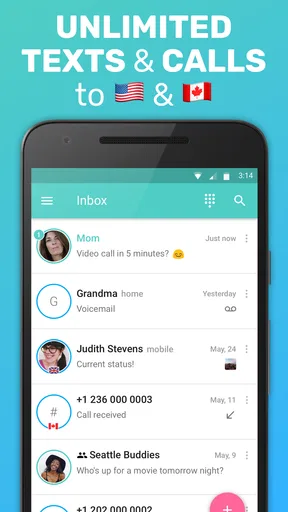
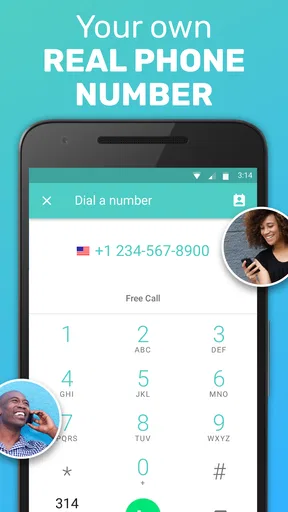
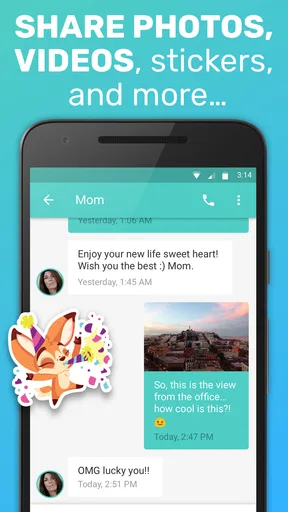
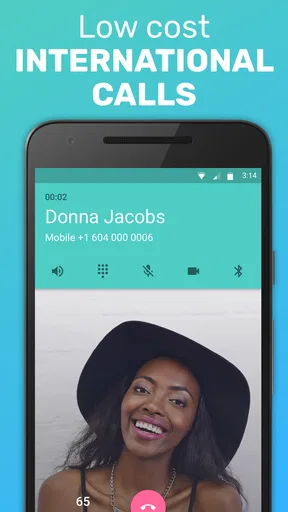
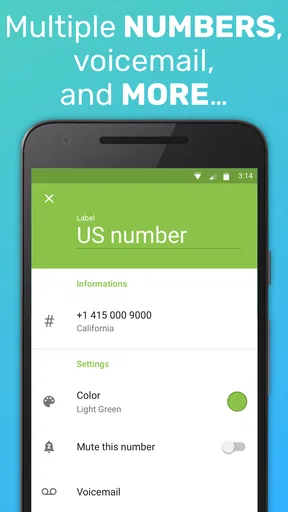
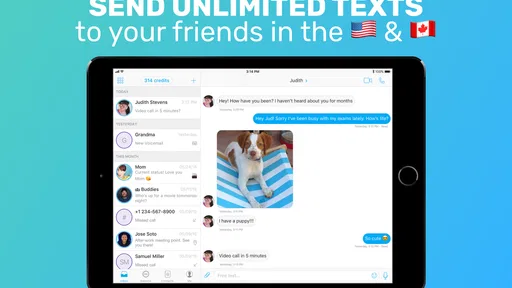
Our Review of FreeTone Calls & Texting
 Analysis by Appyee
In a shared household, a second phone number can be useful for more than saving on a phone bill. I can picture using FreeTone Calls & Texting on a tablet or spare phone for a family member who needs to coordinate pickups, or keeping household calls separate from a personal number. That convenience has a boundary, though: a shared device can also mean shared access to messages and calls, so I’d decide who uses the device and what number it represents before setting it up.
A spare number can simplify everyday coordination
One practical use is a household contact number for routine plans: someone heading home can call to say they are running late, while another person can text a change of meeting place. Group messaging can help when several people need the same update, and picture messaging can be useful when words alone are not enough to explain a location or item. These are modest tasks, but they can keep everyday coordination from getting mixed into one person’s main conversation list.
I would treat that number as a convenient communication channel, not as a universal replacement for every household member’s existing number. If relatives, schools, or service providers already reach someone through a different number, they will not automatically know about a new one. The useful workflow is to share the number only with the people who need it and be clear about who checks it. Otherwise, a message can land in an inbox that nobody is watching.
Set account boundaries before handing over a device
The account setup is straightforward, but the important household question is not how quickly someone can create a number; it is whose account and conversations the device will contain. I would avoid treating one login as a casual family profile. Whoever controls the account should understand that calls and texts associated with it may be visible to other people who can access the device. A separate device and account arrangement is generally cleaner when different adults need private conversations.
This also matters when a phone is passed between people. Before another person uses it, I’d check which account is active, whether notifications might show message previews, and whether the person borrowing it can open the app. Those are ordinary device habits rather than special family tools, but they prevent a shared-number setup from turning into accidental access to private communications. FreeTone is best approached as an app tied to a particular user’s communication, even if the device itself sits in a common area.
Keep expectations clear when plans change
A realistic example is a parent coordinating a pickup with another adult while the usual phone is unavailable or its plan is not the preferred option for that call. A short text can confirm the new time, and a group message can keep the other person in the loop. If a call goes unanswered, voicemail can preserve a message for later. I find this more useful as a backup route for everyday coordination than as the sole place where a household stores urgent plans.
For that workflow, the practical tip is to agree on who will monitor the number and what kind of messages belong there. It can be a place for schedule changes and quick check-ins, while sensitive topics stay on a person’s private channel. That division is not enforced by the app; it is a household agreement. If nobody takes responsibility for checking the number, the extra channel adds confusion instead of reliability.
It is also worth remembering that internet-based calling depends on having a working internet connection. If the household’s Wi-Fi is unavailable and the device has no other way online, the app is not a dependable substitute for ordinary cellular calling at that moment. I would keep another way to reach people for time-sensitive situations rather than assuming a free calling app will always be available.
Age and trust deserve a little thought
The app is rated for Everyone, which makes its stated age context broad, but that does not automatically make every shared-use arrangement suitable for every child. A phone number can receive calls and texts from other people, and messaging creates the usual need for age-appropriate supervision and conversations about who may contact the child. I would not infer parental controls or child-specific protections from the age rating. An adult should decide whether a child is ready to use a number and help establish sensible boundaries.
For adults sharing a device, trust is just as important. A household number may seem neutral, but whoever can access the app may encounter personal conversations or voicemail. If privacy between users matters, a separate account and device is a better fit than relying on informal rules alone. The convenience of one shared point of contact is real, but it comes at the cost of clearer ownership and less separation.
Where it sits among calling and messaging options
Compared with the calling and texting included with a regular mobile plan, FreeTone offers a separate app-based number and can be appealing when the goal is to avoid using a primary number for certain calls. The trade-off is that people need to use the new number and the app relies on an internet connection. Compared with messaging services that mainly connect users inside the same platform, this app is oriented around calls and texts to phone numbers in the US and Canada, which can be more convenient when the person you are contacting does not want to adopt a particular chat service.
That does not make it the strongest choice for every job. If a household already has a reliable plan and values one familiar number for all calls, switching routine communication to another app may create more coordination work than it saves. If frequent overseas calling is central, the credit-based approach may be less straightforward than choosing a service designed around that need. I’d use FreeTone for a specific purpose—such as a backup number or household coordination—rather than assume one app can replace every communication option.
There is also a difference between sending a quick message and maintaining a dependable contact channel. Before relying on it for a recurring responsibility, I would make a test call and text with the people involved, then make sure they have saved the right number. That small check helps reveal whether everyone understands which app and number to use. It is especially worthwhile when a household is dividing responsibilities across multiple phones.
FreeTone is a free social app from TextMe, Inc. Its average rating is 4.1 from around 132,000 ratings, and it has more than 10 million installs. Those figures suggest it has found a sizable audience, but they do not settle whether its approach fits a particular household. The app is free to start, with optional in-app purchases ranging from $0.99 to $79.99 per item, so I’d check the available purchase choices before spending and decide whether the free setup already meets the intended need.
It was released on October 23, 2014, and its current version is 3.55.0, with Android 7.0 as the minimum operating system requirement. The Everyone content rating gives a basic age classification, not a substitute for a family’s own rules about messaging, privacy, and supervision. I’d also make sure the device can run the current app before planning around it, particularly if the household intends to use an older spare phone.
Ever thought about ditching your expensive phone plan and still staying connected with your friends and family? Well, I’ve got just the app for you: FreeTone Calls & Texting. This little gem has been sitting on my phone for a while, and I’m excited to share my experience with you.
Why I Decided to Try FreeTone
Like many of you, I’ve been on the hunt for ways to cut down on my monthly expenses. When I stumbled upon FreeTone, promising free calls and texts, I was intrigued. The app claims to offer unlimited communication in the US and Canada, and who wouldn’t want that? So, I dove right in to see if it lives up to the hype.
Getting Started with FreeTone
First things first, the installation process is a breeze. Available on both Android and iOS, you just download from the app store, and you’re good to go. Once installed, the setup is pretty straightforward. You sign up using your email or through your Facebook account, and bam, you’ve got your new phone number.
The app’s interface is clean and user-friendly. Seriously, even if you’re not tech-savvy, you’ll find your way around without a hitch. There’s a simple menu that guides you through calls, texts, and settings. It’s all about functionality here.
Features That Stand Out
Now, let’s talk about what makes FreeTone a worthy contender in the world of free communication apps. The most appealing feature has to be the unlimited calls and texts to any number in the US and Canada. With just a reliable internet connection, you can chat away without worrying about any additional costs.
Another cool feature is the ability to earn credits for international calls. You get these by watching ads or completing offers, which I find pretty handy if you’re reaching out to friends overseas. The quality of calls is surprisingly good for a free service, and I didn’t experience any major disruptions or drops.
Texting and More
Texting on FreeTone is as seamless as you’d expect. You can send pictures, emojis, and even your location. It’s like having a regular texting service but without the hefty bill. The app also supports group messaging, which is a plus if you’re coordinating with multiple people at once.
One thing I found particularly useful is the voicemail feature. If you can’t pick up a call, FreeTone will store messages for you, ensuring you never miss out on important information.
What About the Downsides?
Of course, no app is perfect, and FreeTone has its quirks. While the app is free, it is ad-supported. The ads aren’t overly intrusive, but they are there, and it’s something to keep in mind. You can opt for a premium version to remove ads, though.
Another point worth mentioning is that while calls within the US and Canada are free, international calls do require credits. However, as I mentioned earlier, these credits can be earned within the app, so it’s not a huge drawback.
The Final Verdict
So, is FreeTone Calls & Texting worth your time? I’d say absolutely, especially if you’re looking to save money on your phone bill. It’s not going to replace your primary number if you need extensive international calling, but for everyday use within North America, it’s a fantastic option.
With its easy setup, user-friendly interface, and the ability to make free calls and texts, FreeTone has carved out a nice little niche for itself. If you’re tired of seeing that monthly phone bill eat into your budget, give FreeTone a whirl. Who knows, it might just be the app you didn’t know you needed.
For more information and to download the app, check out the links below and start your journey to free communication today!
Privacy and Permissions
See what permissions an app requests and how it handles your data.
- Identity
- find accounts on the device, add or remove accounts, read your own contact card
- Contacts
- find accounts on the device, read your contacts, modify your contacts
- Location
- approximate location (network-based), precise location (GPS and network-based)
- Phone
- directly call phone numbers, read phone status and identity
- Photos/Media/Files
- read the contents of your USB storage, modify or delete the contents of your USB storage
- Storage
- read the contents of your USB storage, modify or delete the contents of your USB storage
- Camera
- take pictures and videos
- Microphone
- record audio
- Wi-Fi connection information
- view Wi-Fi connections
- Device ID & call information
- read phone status and identity
- Other
- view network connections, create accounts and set passwords, pair with Bluetooth devices, access Bluetooth settings, send sticky broadcast, allow Wi-Fi Multicast reception, connect and disconnect from Wi-Fi, disable your screen lock, full network access, change your audio settings, read sync settings, run at startup, reorder running apps, draw over other apps, use accounts on the device, control vibration, prevent device from sleeping, toggle sync on and off, Google Play license check, read Google service configuration
Verdict
Strengths of FreeTone Calls & Texting
- Free calls to US and Canada numbers.
- No SIM card needed for communication.
- High-quality voice calls over Wi-Fi.
- User-friendly interface and setup.
- Offers voicemail and call forwarding.
Limitations of FreeTone Calls & Texting
- Ads can be intrusive at times.
- Limited international calling options.
- In-app purchases for additional credits.
- Requires internet connection to function.
- Call quality may vary with network speed.
Other Releases by TextMe, Inc.
View All
Text Me: Second Phone Number
Social4.1

TextMe Up Calling & Texts
Communication4.2
Similar Picks in This Category
View All
Meta Platforms, Inc.4.6

Instagram4.0

Likee-Live, Chat & Party Games
Likeme Pte. Ltd.4.4

Facebook Lite
Meta Platforms, Inc.4.5

TikTok - Videos, Shop & LIVE
TikTok Pte. Ltd.4.0

Moj: Free Short Drama & Reels
ShareChat4.1
Frequently Asked Questions
What is FreeTone Calls & Texting and how does it work?
FreeTone Calls & Texting is an app that allows users to make free calls and send texts to any phone number in the United States and Canada. It operates using an internet connection, either through Wi-Fi or mobile data, enabling cost-effective communication without the need for a traditional phone plan.
Does FreeTone require a subscription or any hidden fees?
FreeTone offers a free version with basic features. However, some advanced features may require in-app purchases or a subscription. Users should be aware of these potential costs, especially if they plan to use premium services such as international calls or additional credits.
Can I use FreeTone on multiple devices with the same account?
Yes, FreeTone allows you to use the same account across multiple devices. This means you can seamlessly switch between your smartphone and tablet while keeping your messaging and call history synchronized, as long as you are logged into the same account.
Is my data secure when using FreeTone Calls & Texting?
FreeTone employs standard security protocols to protect user data. However, as with any app that handles personal information and communication, users should ensure they have secure passwords and be cautious about sharing sensitive information over the app.
What are the requirements for installing FreeTone on my device?
To install FreeTone, your device needs to be running on a compatible version of Android or iOS. Typically, this means having a relatively recent operating system. Additionally, a stable internet connection is required for optimal performance, especially for making calls and sending texts.
